
Picture Taken on Jul-20-07 in Osigo, Veneto, Italy

Picture Taken on Jul-27-07 in St. Peter's Basilica, Rome, Italy
Monday, February 4, 2008
On to the Next Language...
After working with several computer programming languages including Turbo Pascal, Python, and Visual Basic, our ICT class will now be moving on to Visual C++. Hmmm...I wonder how many different languages we'll know by the end of the year?

Wednesday, January 16, 2008
Computer Disassembly Project
At the end of December 2007, our ICT 12 class had the opportunity to disassemble a retired Compaq DeskPro computer in order t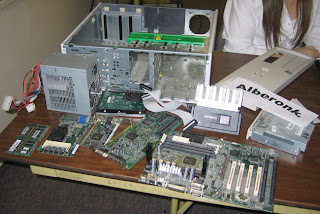 o learn more about how computers, in general, function. After removing the top of the computer’s casing, one of my classmates and I observed the computer components in their respective places before beginning the required disassembly. Using various computer tools, we carefully removed each component and recorded their removal on the checklist. We started off removing all of the data and power cables which connected various components together, and then carefully removed the various cards and boards, and RAM as they became unobstructed. The most difficult component for us to remove was the CPU as it was fastened in very tightly, but we were eventually able to unfasten it with some force. One set of components which I found particularly interesting were the CPU cooling fins, simply because I never expected to find something of that appearance within the computer, and they are actually quite innovative in their removal of accumulated heat.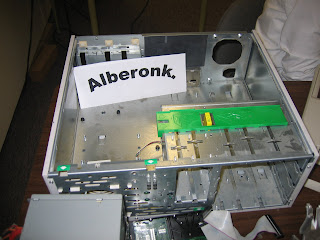
After completely removing all computer parts we began to reassemble everything we took apart. Although it seemed like a daunting task at first, we were slowly able to correctly replace all of the components. After securing the motherboard, various cards, and drives in place, as well as replacing the front panel, we began to attach the data and power cables. Determining where these cables belonged took some time, as there were several extra power cables, but eventually we were able to figure out which ones needed to be connected. After our reassembly was complete, we did not attach our computer to a power source for testing, but according to our teacher everything was secured properly in its respective place.
 o learn more about how computers, in general, function. After removing the top of the computer’s casing, one of my classmates and I observed the computer components in their respective places before beginning the required disassembly. Using various computer tools, we carefully removed each component and recorded their removal on the checklist. We started off removing all of the data and power cables which connected various components together, and then carefully removed the various cards and boards, and RAM as they became unobstructed. The most difficult component for us to remove was the CPU as it was fastened in very tightly, but we were eventually able to unfasten it with some force. One set of components which I found particularly interesting were the CPU cooling fins, simply because I never expected to find something of that appearance within the computer, and they are actually quite innovative in their removal of accumulated heat.
After completely removing all computer parts we began to reassemble everything we took apart. Although it seemed like a daunting task at first, we were slowly able to correctly replace all of the components. After securing the motherboard, various cards, and drives in place, as well as replacing the front panel, we began to attach the data and power cables. Determining where these cables belonged took some time, as there were several extra power cables, but eventually we were able to figure out which ones needed to be connected. After our reassembly was complete, we did not attach our computer to a power source for testing, but according to our teacher everything was secured properly in its respective place.

Wednesday, January 9, 2008
OLPC and Microsoft
It has been suggested that OLPC and Microsoft will be working together to develop a version of Windows for XO laptops. Read through this article, at http://www.news.com/8301-13579_3-9847295-37.html?tag=nefd.top, if you're interested in learning a little more about this partnership.
Tuesday, January 8, 2008
OLPC Laptops in Peru
Are you wondering how well the OLPC XO Laptops are being put to use? Check out this article at http://www.cnn.com/2007/TECH/ptech/12/25/onelaptop.onevillage.ap/index.html, and read though a wonderful account of their distribution in a small, Peruvian village.
Sunday, January 6, 2008
Computer Clean-Up
If you're looking to clean up or simply rearrange your computer files, www.download.com offers many free and effective programs that can make this an easy task for you.
Three very highly ranked programs which can be found at www.download.com are WinDirStat, CCleaner, and Auslogics Disk Defrag. From my experience with them, I've found that they really do work well, so make sure to check them out!
Three very highly ranked programs which can be found at www.download.com are WinDirStat, CCleaner, and Auslogics Disk Defrag. From my experience with them, I've found that they really do work well, so make sure to check them out!
Wednesday, December 12, 2007
Python @ NDRS
 If you are interested in learning about the computer programming language of Python, http://www.myndrs.com/python/ , run by our ICT 12 teacher, Mr. Vogel, is a great site to click through. It contains countless informational resources as well as as a link to download the Python development package.
Digital Cameras Survey, December 2007
If you're looking to buy a camera, make sure to visit http://www.ndrs.org/iol/cameras.htm for an updated list of all of the latest and greatest camera models that can be found in the Lower Mainland. Included on the site are camera prices at various stores, camera resolutions, and a few of each camera's special features. Remember that all prices refer to the Vancouver area.
Subscribe to:
Posts (Atom)
